


I am on an exciting learning journey…learning how to use AI to improve my investing and trading processes and methods. I have been writing about this…here are the past posts in this series:
Using different tools for different purposes
Best settings for each AI tool
I have looked for good training on how to use AI and did not find anything that fit my needs. Most of what is out there is clickbait crap or very basic for a retail investor to truly draw value from. So I decided to learn it myself and share my findings with you.
I have to say that so far it has been a very interesting and exciting learning journey. And I feel that I am just getting started and have miles to go…
This work has so far helped me:
Find and initiate 4 new S.W.A.T. positions in my investing portfolio.
Screen and buy 3 new multi-bagger small cap picks in my Salty trading portfolio.
Close a long term LEAP trade in one stock for a sizable gain and find 3 similar trade ideas…with a 4th one cooking.
Readers are also seeing some of my BeachmanAI output in the form of more informative stock reports, concise yet actionable earnings analysis and Beachman scores for many more (100+) stocks AND much sooner after they report their quarterly earnings.

So follow along..read along…as I write about my AI journey in easy to follow short snippets…getting back to my Beachman roots where I want you to clearly and quickly understand what to do and how to do it…so that you can be up and running in no time with your own mini-AI investing helpers.
I continue to invest the S.W.A.T. (Sleep Well At Night) way…the Beachman way. Now, AI is serving as a junior analyst employee to help me peek around the corner more effectively…looking for opportunities and monitoring risks that I, as one human being, am unable to do at the same scale and level of detail.
So, let’s dive back into the magical world of AI…
Today, we will figure out how best to setup projects in Claude and why it is important to do this.
Welcome to Beachman AI’s Investing Whispers, where we invest in market-leading stocks and ETFs with Beachman’s proven long-term record and a lower risk approach. Over the past 6 years, our structured investing has delivered an average annual return of +141% at a CAGR of +43%.
Our chat line is open to all readers. It is now FREE to join in daily discussions about markets, investing and trading. Use this link to chime in on the conversation: Beachman’s Chat Line
For Beachman’s other portfolio, check out Beachman’s Salty Trades, with 6 multi-bagger picks cooking, using bottoms up research and technical signal based trade ideation and execution…where we recently logged our 22nd multi-bagger stock and trade gains of up to +69%.
P.S. Stock Analysis (SA), my favorite financial research service, is offering a special discount exclusively for us. SA provides comprehensive, timely market data via a well-designed, easy-to-use experience and at a very attractive price point. Use the link StockAnalysis and the promo code “BEACHMAN” for an extra 10% discount.
Table of contents
Why projects are important in Claude
How to setup a project in Claude
Coming up next
Why projects are important in Claude
When it comes to investing and trading, each of you have a frame of mind, risk tolerance, goals, styles, age, financial situation etc that is unique to you. This colors your actions and decision making process. Projects help encapsulate and remember this personal context every time you use it. A project keeps everything in one place. Via a project, Claude already has the background it needs, so you can pick up where you left off and keep moving forward with every task you give it to complete. It saves you time and tokens…increasing how efficiently Claude responds to you.
e.g. Lets say you ask Claude to analyze a company with particular focus on certain fundamental metrics, growth measurements and valuation parameters. The 2nd stock you ask it to analyze can be done the same way without needing to provide all the instructions again. You can create a skill (topic for a future post) on how to analyze a stock…the skill contains instructions and context that lives within the project and Claude reuses it every time in the future.
Over time, you will notice Claude’s answers getting better. Not perfect, just more on track. Less cleanup after. It sticks closer to how you think about things. That adds up as you use it more. Without projects, your work ends up scattered across threads and it’s harder to trust what you’re getting. With a project, it feels more stable and consistent. You spend less time fixing stuff and more time actually using it.
I have two projects in my Claude setup…one for stock and portfolio analysis…the second for stock screening.
Stock and portfolio analysis: Here I want Claude to remember and reuse past context and skills / instructions…stock analysis methods, rules, calculations, key metrics, stocks that I own in my portfolio, my investor profile, risk tolerance etc.
Stock screening: I use a separate project for screening because I particularly DON’T want Claude to be biased by my past requests and current stock holdings. I would rather that Claude screen across the universe of stocks to find what I am looking for without paying heed to past context and requests. E.g. I don’t want it to skip recommending a good AI stock just because it knows that I already own a heavy allocation to AI in my current portfolio.
How to setup a project in Claude
Setting up a project in Claude is simple. Go to the Projects section in the left side menu and click “New Project.” Give it a name that actually reflects what you’re doing, not something vague you’ll forget later. Add a description that provides a high level overview of the kind of work you will do within the project.

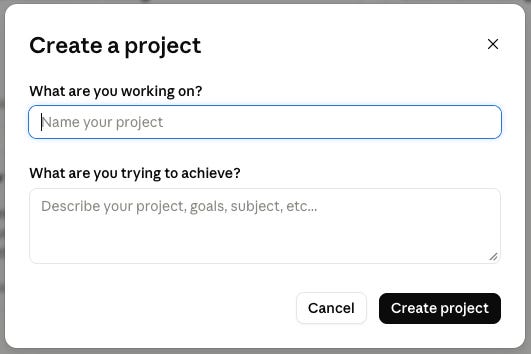
Once the project is open, start by adding your base context. Upload portfolio files if you have them. Look for the “Add content” or upload or + button inside the project workspace. Click that and choose “Upload files.” From there, select the files from your computer. PDFs, docs, spreadsheets etc. Once uploaded, you’ll see them listed in the project. That means Claude can now reference them in that project’s chats.
Drop in a brokerage statment PDF, a portfolio spreadsheet or CSV file, investing notes, past analysis work, or even a short prompt that explains how you want Claude to think. Keep it tight. You don’t need everything, just enough so it understands the job. From there, start your first chat inside the project and build from that instead of opening new threads outside the project.
For the first chat within the project, try a short “anchor” prompt that starts a conversation. E.g. You might ask Claude to analyze your current investing portfolio and provide key findings, pros, cons, gaps and recommendations. Keep all follow up requests or chats in the same place within the project. As you go, update the project with new info / files instead of repeating yourself in prompts. If something changes, fix the source context e.g. You might upload a new portfolio file if you made change to your holdings. E.g. I tend to upload a new portfolio file once a week every weekend.
Going forward, do all related work within the project workspace…all prompts, all chats, all input files…do it all inside the project.
NOTE: I only use projects in Claude. I don’t use projects in ChatGPT when analyzing trade ideas…because each trade is a unique idea that needs to be analyzed separately. I also don’t use projects in Google Gemini where most of my prompts are adhoc, individual requests. Of course, if you use one of these LLMs as your main Ai engine, then setup your projects in there and vice versa. The project concept is the same in all LLMs.
Also important to note that I don’t upload personal information into Claude like my name, address, contact info, account numbers, userids or passwords etc.
Coming up
Go ahead and create your own project(s) in Claude, upload some supporting files of information and ask Claude to analyze your portfolio, a particular stock that you own or a new stock that you are interested in.
Remember, use Claude like a junior Wall Street analyst on your team. “Chat” with it like you would do with a human being. Give it instructions, look at its response and ask it to refine its answers by providing further instructions. Keep playing with these AI engines with different types of prompts and queries. Over time you will get more comfortable with using AI.
And we will take this AI trek one step at a time. Lots to try out and learn. Many miles to go but we will get there together.
Cheers and thanks for your support.